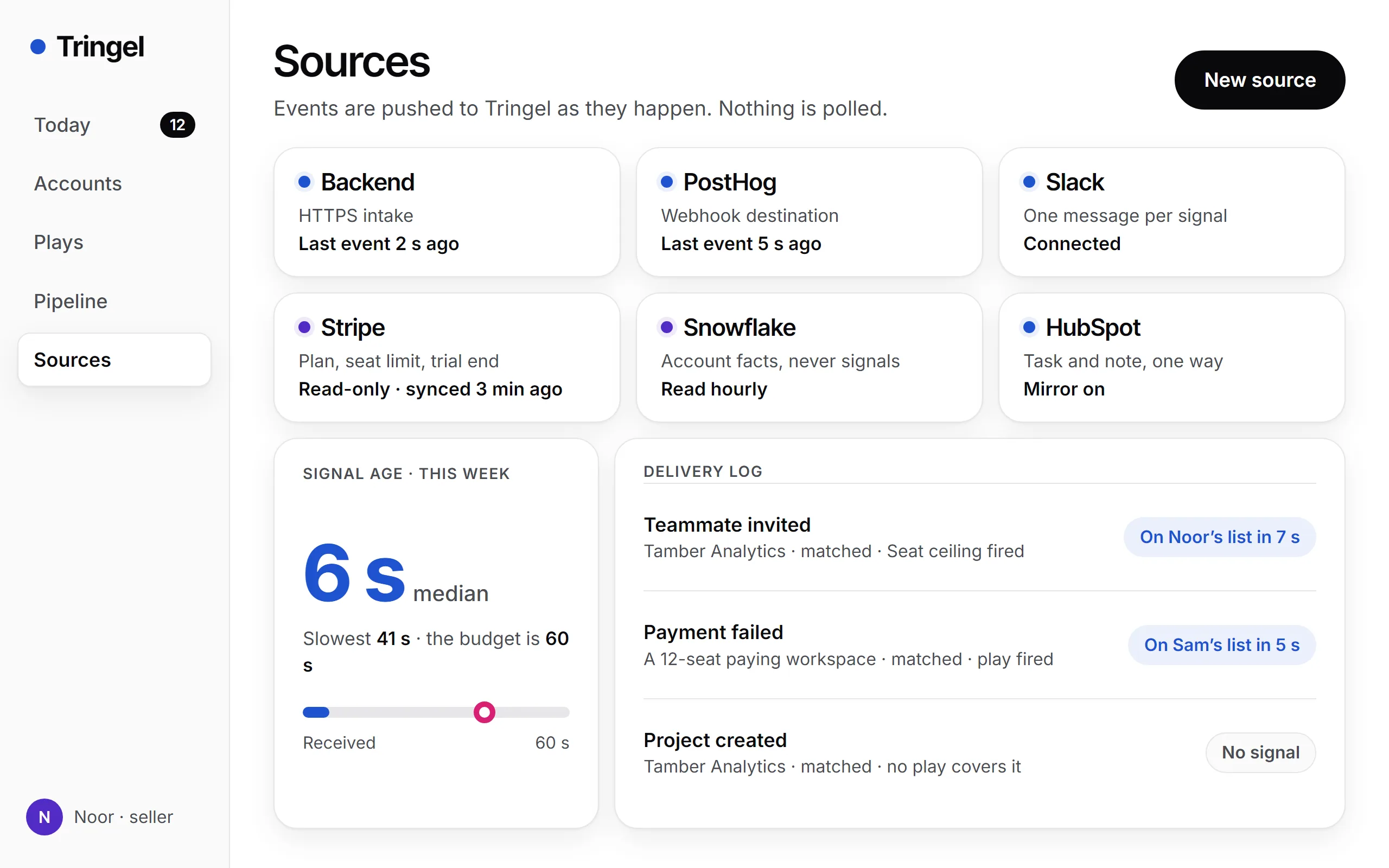
Received - Your backend or an Azure Function posts the event, or PostHog sends it by webhook.
A CRM for product-led sales
The account that just hit its seat limit is on a rep’s list within 60 seconds of the event reaching us.
Tringel is a CRM for sales teams whose customers sign up on their own. Your product sends it events as they happen, and the account worth calling today lands on its rep’s list, the reason written by a language model.
A working sandbox, with your own pipeline already in it.
- Ninth invite on an 8-seat plan
- Usage passed the monthly limit
- Admin on pricing during a trial
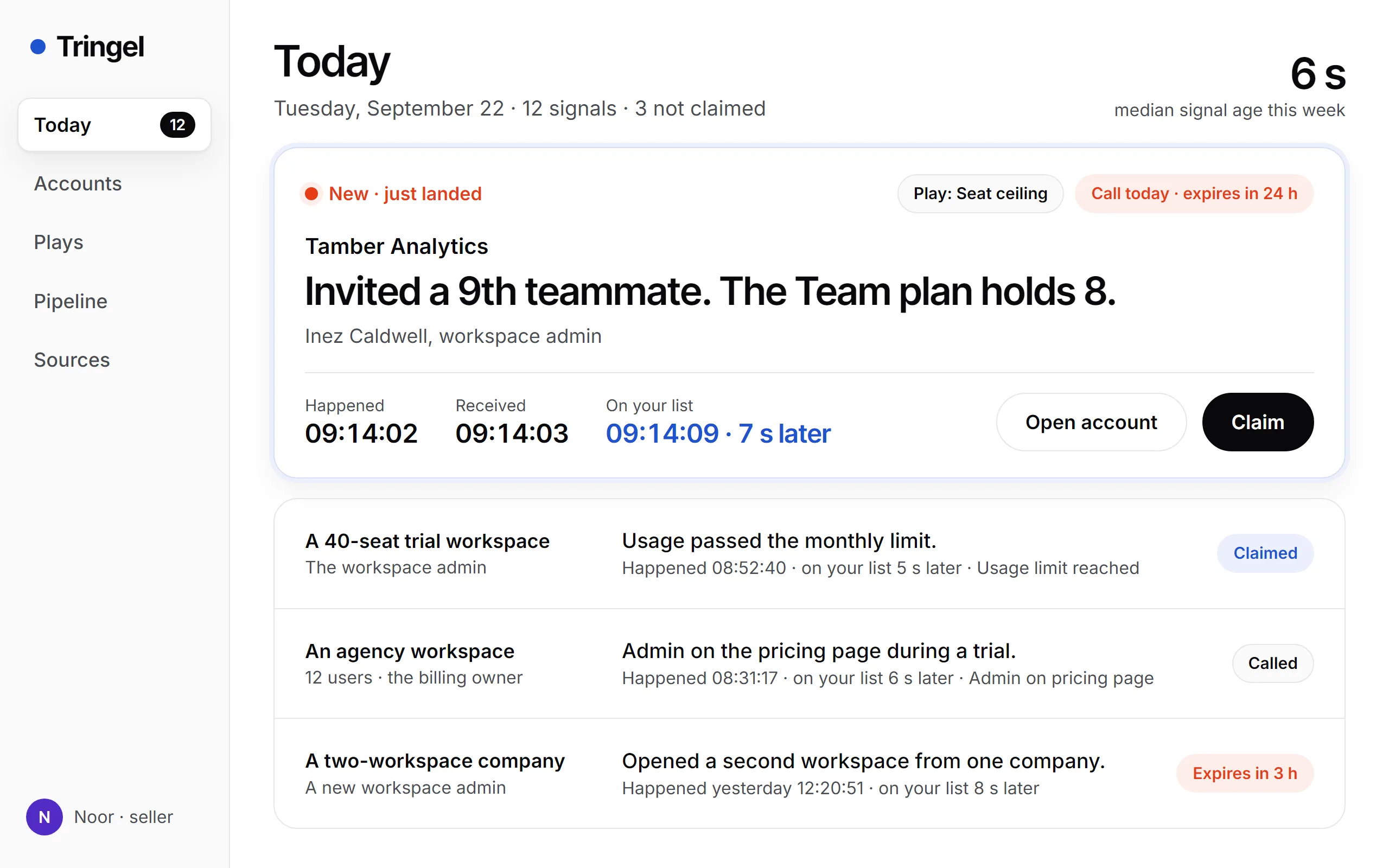
60 seconds
Our budget from event received to signal on the list.
Reason already written
One plain sentence per signal, and who did it.
One click to log it
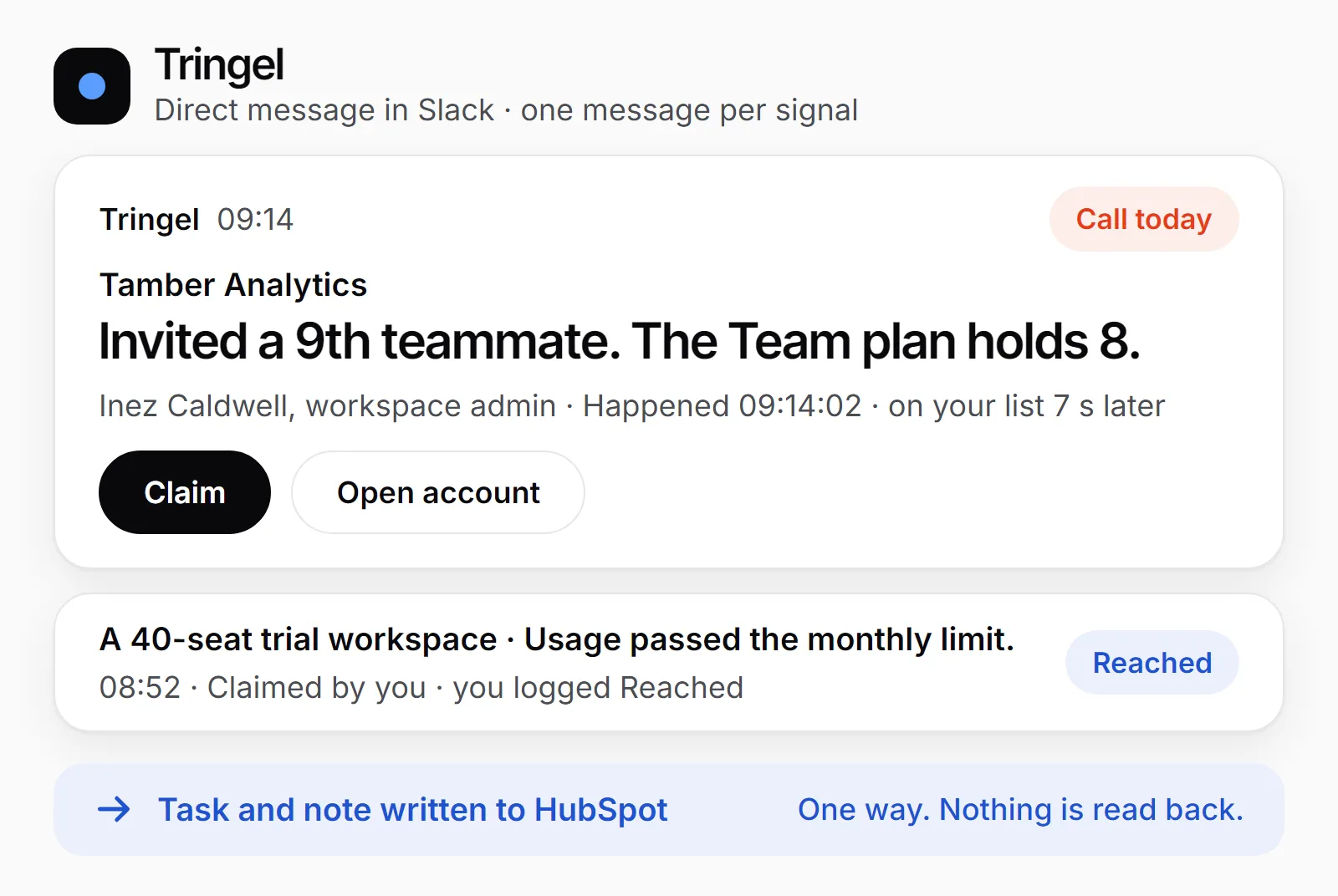
Booked, Reached, No answer or Not now.
How it works
Your product pushes each event. Nothing here waits for a scheduled pull.
Zero’s integrations doc lists PostHog usage events every 4 hours. Its API doc says beta, access by request, no webhooks documented. Tringel takes events only as they happen.
Tringel reads Stripe and Snowflake on a schedule. They fill in account facts and never raise a signal.
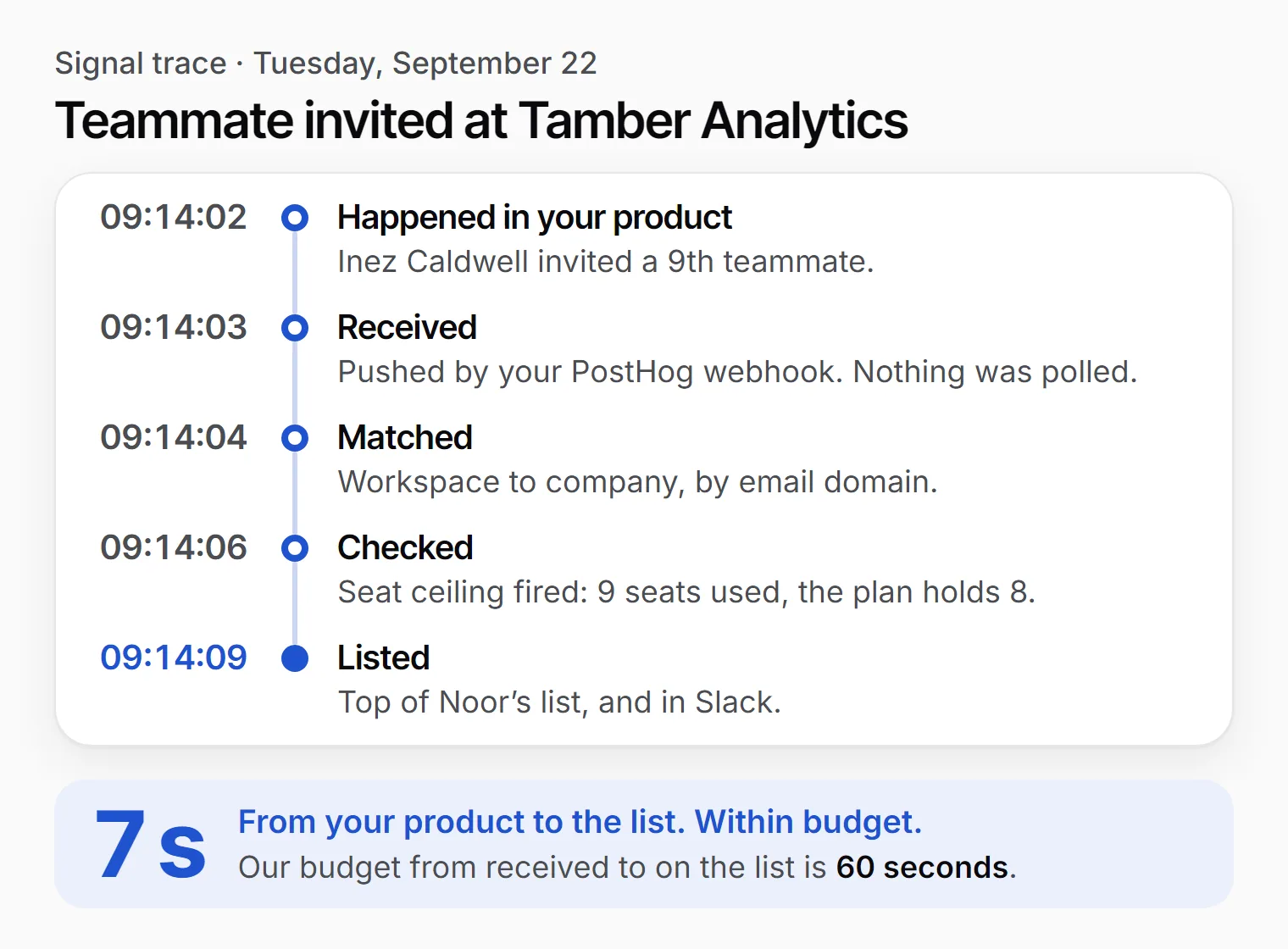
Matched - Workspace to company, by email domain or Stripe customer. A doubtful match is held for someone to confirm.
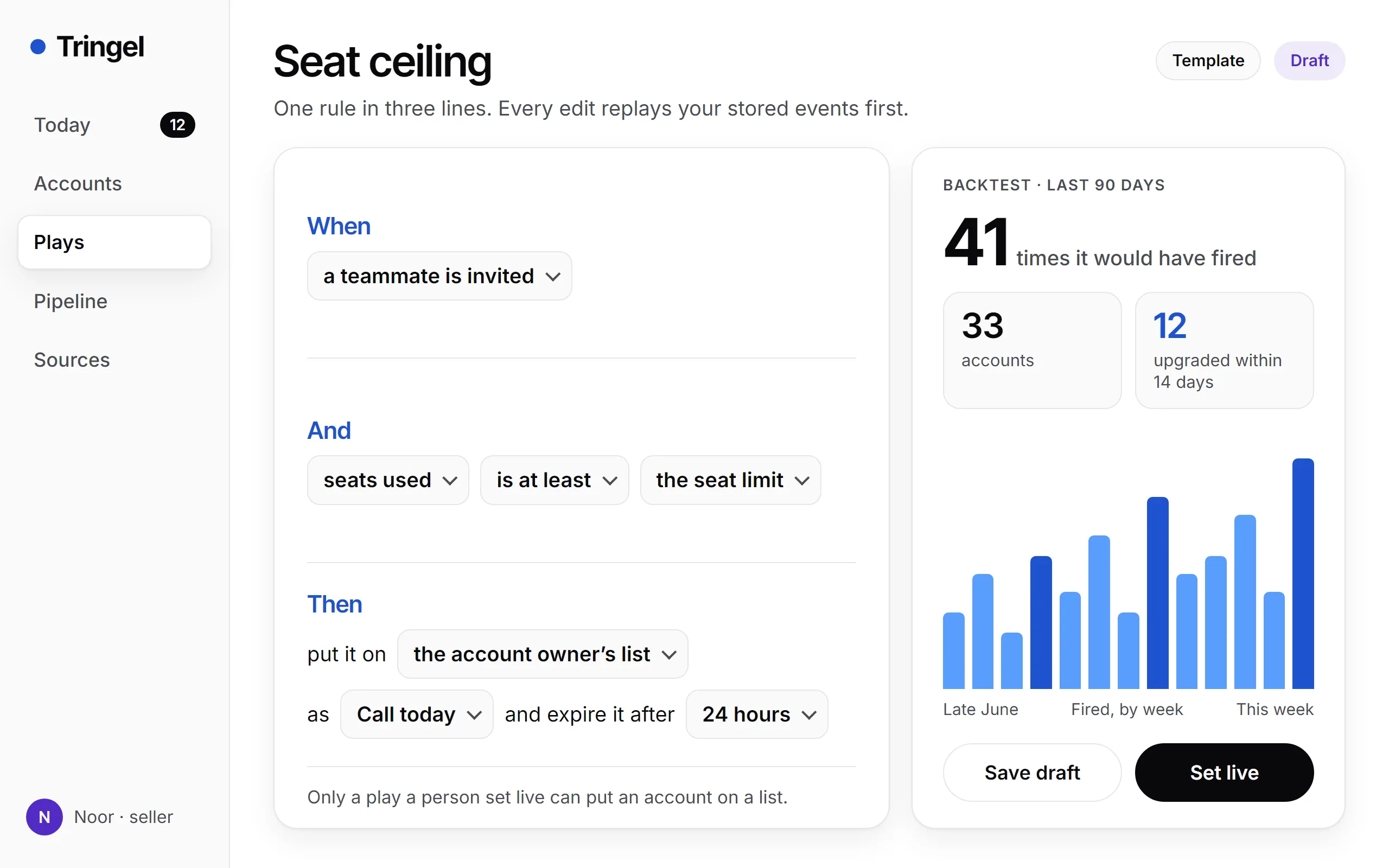
Checked - Each live play, a three-line rule you wrote, tests the event.
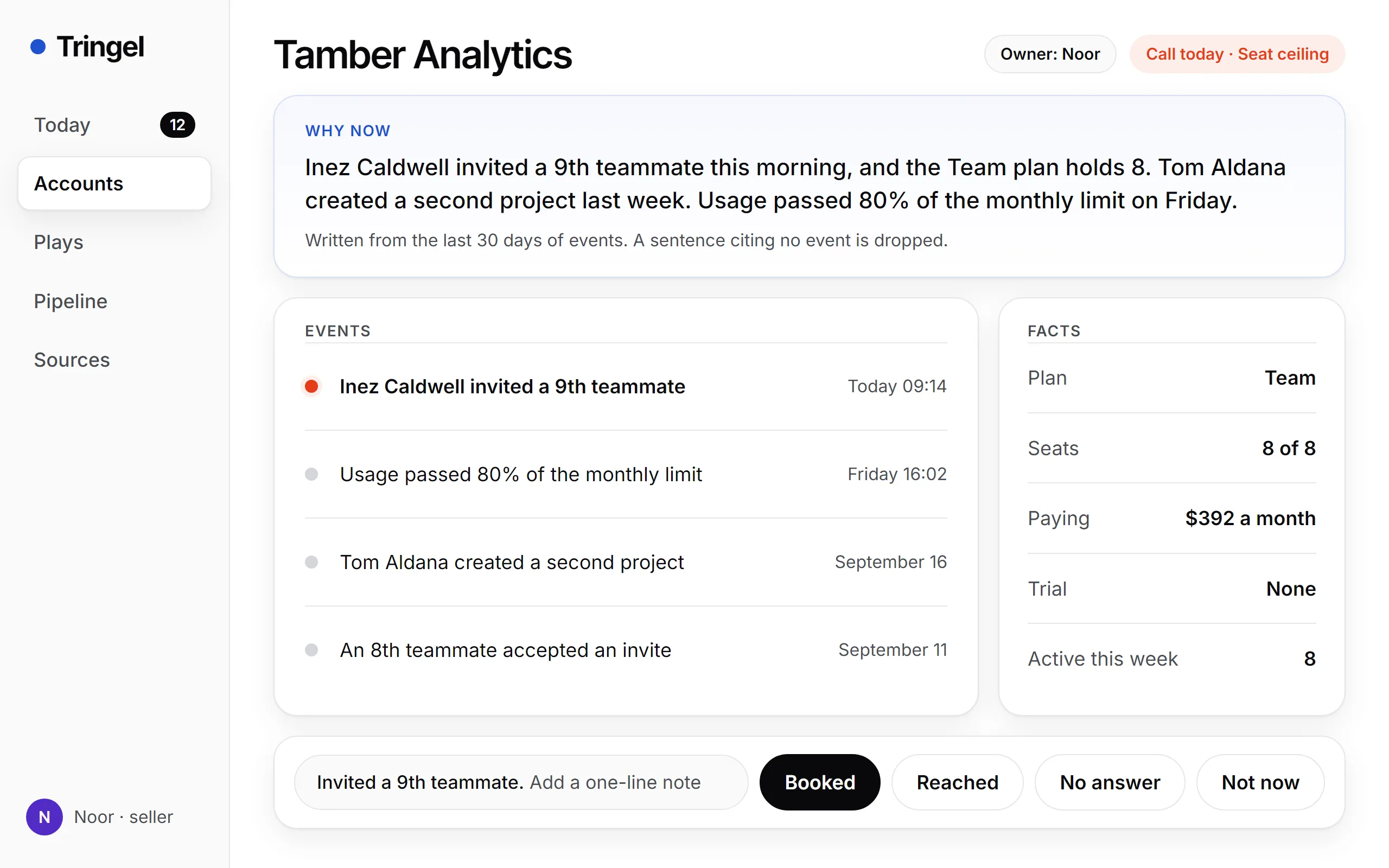
Listed - “Invited a 9th teammate. The Team plan holds 8.” on top of the owner’s list, and in Slack.
Stamped - Each signal prints three times: happened, received, on the list.
Your stack
Six connections, each marked in, out or read-only
Your own backend posts events with a six-line snippet. These six tools cover the rest.
- PostHogevents in, by webhook
- Stripeplan, seat limit, trial end. Read-only.
- Snowflakeaccount facts, read hourly
- Slackone message per signal, with Claim
- HubSpottask and note, one way
- Salesforcetask and note, one way
What it does
A call list where every line says why, and every call ends in an outcome
Salesforce’s 2022 State of Sales research found reps spend 28% of their time selling, across an average of 10 tools. Nothing in this record depends on a rep typing.
- TodayA rep’s call list. Each line: account, reason, person, age.
- Why nowThree sentences on the last 30 days. A sentence citing no event is dropped.
- Four outcomesBooked, Reached, No answer, Not now. One click, optional note.
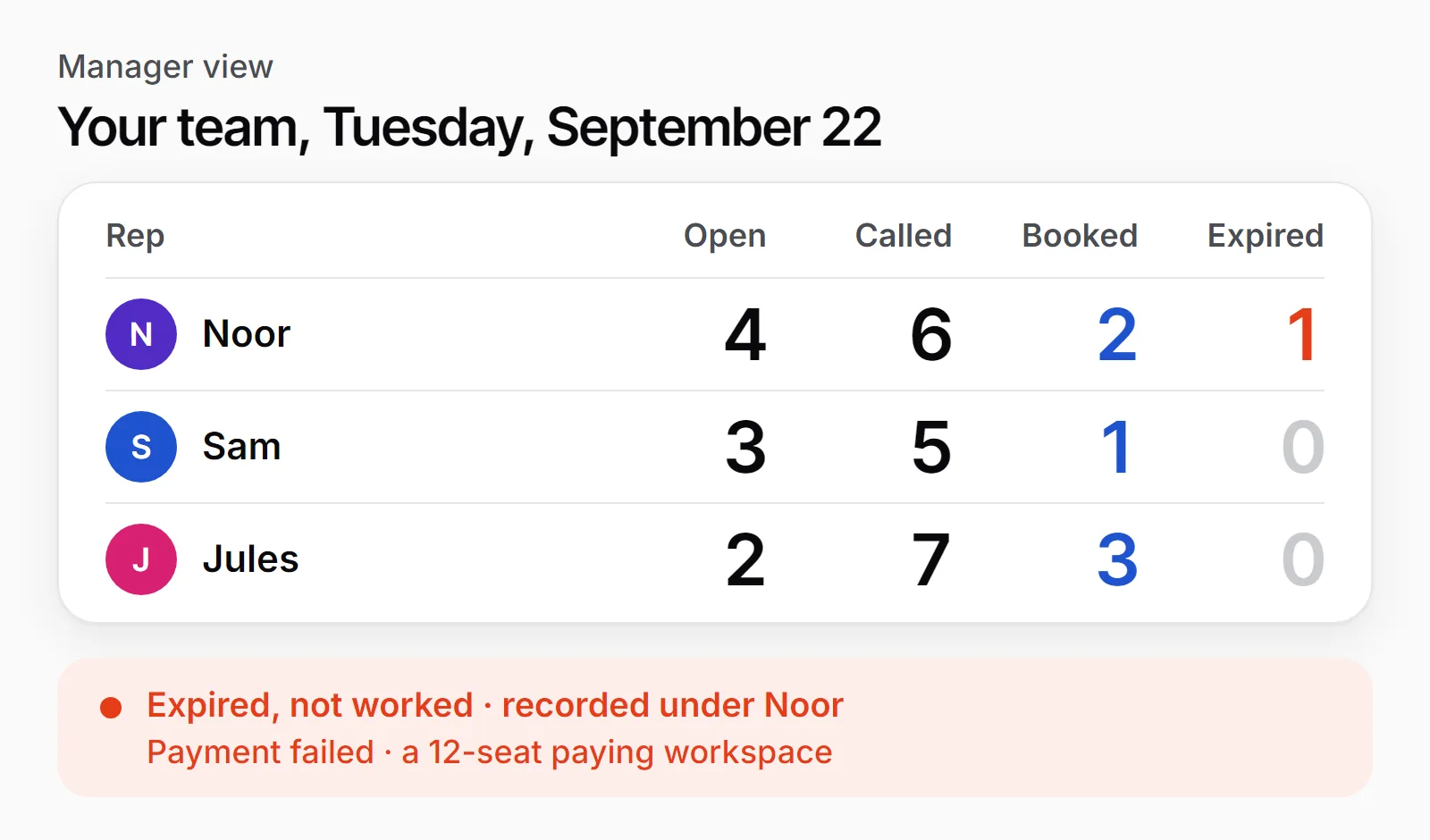
- ExpiryAn unclosed signal is recorded as Expired, not worked, under the owner’s name.
- PipelineBooked opens a deal that names the signal behind it.
- Manager viewCounts per rep: open, called, booked, expired.
Matches, briefs, plays
Three models stand behind each line on the list
An embedding model proposes the account match from workspace traits. An open-weight 8B model writes the brief from recent events. A sequence model drafts plays from what preceded past upgrades.
Under 0.92 - a proposed match waits in Unmatched for a person
Not mirrored - signals on an unconfirmed match stay out of HubSpot and Salesforce until a person confirms
Backtest first - a drafted play stays a draft until your head of sales reads it and sets it live
Never pooled - your matches, edits and outcomes tune your workspace alone
Inside the product
Account, Plays and Sources: where the list comes from
The accounts and numbers in these views are samples.
Why it is built this way
Only a rule your team wrote can put an account on a list
A model can draft a play with its backtest. It cannot add a signal or hide one.
A rep can read any play in one sentence and see why an account was listed.
Validity’s 2025 survey found 76% of CRM users say under half their data is accurate. A score nobody can trace adds to that.
Until someone writes the first play, the list is empty. A buying moment no rule covers is missed.
Getting started
You cannot finish setup alone. It takes an engineer about an hour.
Each event must say which workspace, which user, what happened and when.
1. Open the sandbox
Work email in, sample events already flowing.
2. Send one real event
An engineer adds a PostHog webhook or a six-line POST. You both watch it land.
3. Set a play live
Read the backtest on the Seat ceiling template, ninth invite on an eight-seat plan. Press Set live.
Then an hour or two on the Unmatched list. Workspaces opened on personal email need a person to confirm the company.
Pricing
$240 to $1,400 a month per company. Viewers are free, and there are no credits.
Pod
$240per company / month
Four seats of Zero Pro are $240 a month in year one and $308 after. With two or three sellers, Zero Pro costs less than Pod.
- Up to 4 seller seats. Everyone who only looks is free
- 1 event source: your backend or a PostHog webhook
- 2 million events a month, and no overage billing
- 5 live plays, backtest over the last 90 days
- Today list, a Slack message per signal, required outcomes
- Stripe read-only for plan, seat limit and trial end
- One-way mirror to HubSpot
Team5 to 10 sellers
$600per company / month
Up to 10 sellers, three sources. Ten seats of Zero Pro are $600 in year one, then $770, and that buys mail capture and a dialer too.
- Everything in Pod
- Up to 10 seller seats
- 3 event sources, 10 million events a month
- Unlimited live plays, backtest over 12 months
- Candidate plays proposed from your own outcomes
- One-way mirror to Salesforce or HubSpot
- Account facts from Snowflake, read hourly
- Round-robin and territory ownership rules
Floor
$1,400per company / month
Up to 25 sellers, with SAML sign-on, an audit log and a staging workspace for testing plays before they go live.
- Everything in Team
- Up to 25 seller seats
- Unlimited sources, 50 million events a month
- SAML single sign-on and role-based access
- Audit log of every play edit and ownership change
- A staging workspace with its own source keys
- Invoice billing and a signed DPA
Request a sandbox
- 30 days free, without a card, counted from your first live event.
- The same price in month 13. Changes are announced 90 days ahead.
- A month whose median passes 60 seconds, received to on-list, is credited in full.
- Monthly. Cancel from Settings, no notice. CSV and JSON export for 90 days after.
What it is not
Pick Zero if your deals live in email. Pick Tringel if they start in the product.
Zero’s price buys more product. Tringel’s buys the path from a product event to a logged call.
What's in scope
- 01Self-serve signups, 2 to 25 sellers, events that name the workspace.
- 02Needs someone who can add a webhook or a six-line POST.
- 03Your CRM stays: HubSpot or Salesforce gets a task and a note. Salesforce from Team.
What we don't do
- 01No capture from mail, calendar, calls or LinkedIn. Zero fills itself from all of those.
- 02No prospecting, sequences, dialer or enrichment; Zero has them. The rep gets the name and signup email your product sent.
- 03No account scoring, and no events pulled from a warehouse.
Watch one of your own events reach a rep’s list
Tell us who you are and which company you sell for. The sandbox arrives with sample events already running, plus a source key to hand your engineer.
We reply within one business day.
- ✓ The sandbox stays open for as long as you use it
- ✓ A 45-minute setup call between your engineer and ours, free
- ✓ 12 months of past events loaded free for your first backtest